


By Anushka Verma | Updated: October 22, 2025
Introduction: The Next Evolution of the Internet
OpenAI has officially unveiled ChatGPT Atlas, a groundbreaking AI-powered web browser designed to transform how users interact with the internet.
Built around a conversational interface, Atlas allows users to chat directly with websites, automate online tasks, and personalize their browsing experience using ChatGPT’s advanced memory and agentic capabilities.
Available now for macOS users and priced at $0, Atlas aims to create an intelligent, interactive, and personalized browsing experience that blurs the line between searching, working, and creating online.
OpenAI CEO Sam Altman described Atlas as a “browser for the next era of the web,” built to make browsing more personal, intuitive, and productive.
What Makes ChatGPT Atlas Unique
Unlike traditional browsers, ChatGPT Atlas places ChatGPT itself at the center of browsing.
There’s no separate search bar or box — users simply talk to the browser. Whether you want to summarize a webpage, fill a form, or book a ticket, you just ask Atlas to do it.
This makes Atlas the first truly agentic browser, where your AI assistant doesn’t just help you find things—it can act for you.
Core Features of ChatGPT Atlas
| Feature | Description | Availability | Pricing |
|---|---|---|---|
| Conversational Interface | Chat directly with any webpage, get summaries, or ask for insights. | macOS | Free |
| Memory Personalization | Remembers preferences, history, and browsing patterns. | Plus & Pro users | ₹1,999/month ($20) |
| Agent Mode | Automates tasks like form-filling, scheduling, or ordering items. | Plus & Pro users | Included |
| Privacy Controls | Manage, pause, or delete browser memory at any time. | All users | Free |
| Sidebar Chat Window | ChatGPT can appear beside any webpage for quick help. | macOS | Free |
Conversational Browsing: Chat, Don’t Search
OpenAI’s engineering lead, Ben Goodger, who previously worked on Google Chrome, explained that Atlas was built around one core idea: “chatting with your browser.”
Instead of opening multiple tabs or typing keywords, users can talk to Atlas in natural language.
For example:
- “Compare the top electric cars launched this year.”
- “Summarize this article for me in 3 lines.”
- “Fill this form with my saved details.”
ChatGPT responds conversationally, retrieving, summarizing, or even executing tasks instantly.
This conversation-first model transforms browsing into an intelligent dialogue, making the web more accessible and efficient.
Agent Mode: Let AI Work for You
The highlight of ChatGPT Atlas is its Agent Mode — a feature that allows ChatGPT to take actions inside the browser.
This means it can:
- Fill out forms automatically
- Add tasks to your project tools like Trello or Notion
- Book tickets or order groceries online (with confirmation)
OpenAI demonstrated Atlas performing these real-world actions safely and efficiently.
Every step requires user approval, maintaining transparency and preventing unauthorized actions.
Privacy and Control
The AI agent operates strictly within browser tabs — no access to your local files or system.
Users can monitor all actions, view history, and control when or how Atlas acts on their behalf.
Memory: Your Personalised Internet Companion
Atlas introduces browser memory, a feature that allows ChatGPT to remember:
- Your frequently visited sites
- Reading preferences
- Saved projects or workspaces
It can suggest related topics, recall previous sessions, and continue tasks seamlessly.
For example:
If you research marketing trends often, Atlas may automatically bring up recent data from trusted sources the next time you ask.
Users can disable or clear memory anytime, ensuring complete privacy control.
How Atlas Differs from Other AI Browsers
The launch of ChatGPT Atlas comes amid a wave of AI browser innovation. Competitors like Perplexity’s Comet, Google Chrome’s Gemini integration, Microsoft Edge’s Copilot, and Brave’s Leo are all chasing the same goal — agentic, intelligent browsing.
Here’s how Atlas compares:
| Browser | Core AI | Key Feature | Pricing |
|---|---|---|---|
| OpenAI Atlas | ChatGPT | Conversational + task automation | Free / $20+ |
| Google Chrome | Gemini | AI assistance within tabs | Free |
| Microsoft Edge | Copilot | Deep Windows integration | Free |
| Perplexity Comet | Perplexity LLM | Answer-first design | Free |
| Opera Aria | Aria AI | Sidebar summaries | Free |
| Brave Leo | Leo | Privacy-focused chat | Free |
Unlike others, Atlas is built natively around ChatGPT, not as a plugin or add-on.
This gives it smoother performance and deeper comprehension of user intent.
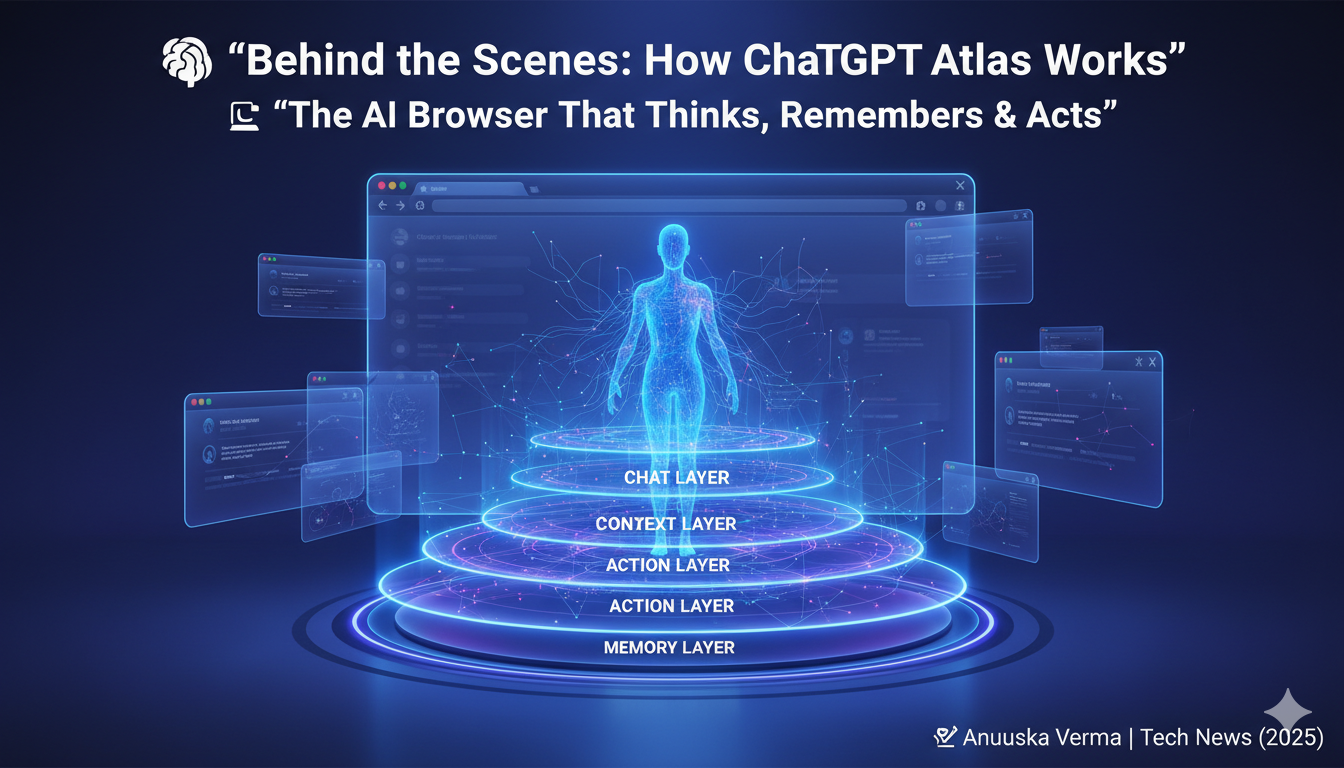
Behind the Scenes: How It Works
OpenAI built Atlas using a multi-layer AI architecture:
- Chat Layer – Handles conversation and natural language input.
- Context Layer – Understands webpage content and user goals.
- Action Layer – Executes commands like clicks, fills, or navigation.
- Memory Layer – Stores preferences and learning data (with consent).
This structure allows Atlas to see, think, and act — much like an intelligent human assistant online.
A Day with ChatGPT Atlas
Let’s imagine a typical day using Atlas:
- Morning: You open Atlas and say, “Summarize today’s tech headlines.” Within seconds, it provides a neatly formatted digest.
- Afternoon: You ask it to “write a quick reply to my client email and schedule a Zoom call for Friday.” Atlas drafts and sets it up automatically.
- Evening: You tell it, “Order my usual groceries from BigBasket,” and it does so after confirming your preferences.
This flow shows how Atlas turns browsing from a manual process into a smart conversation.
Privacy and Security: Transparency First
OpenAI emphasizes that Atlas prioritizes privacy and security.
- AI actions occur within browser boundaries.
- No access to local storage or external apps.
- You can pause memory, clear data, or disable agent mode anytime.
OpenAI confirms compliance with GDPR and CCPA privacy laws, ensuring users retain full control over their data.
Pricing and Availability
Atlas is currently available free for macOS.
However, Agent Mode and Memory features are exclusive to:
- ChatGPT Plus subscribers — $20/month (₹1,999/month)
- ChatGPT Pro subscribers — $30/month (₹3,499/month)
Windows and mobile versions will roll out in early 2026, with beta testing already underway.
Benefits and Limitations
| Advantages | Limitations |
|---|---|
| Conversational, intuitive interface | Currently macOS-only |
| Automates repetitive tasks | Agent Mode limited to paid tiers |
| Personalized memory system | Requires internet connection |
| Privacy-first design | May need learning adaptation |
| Integrated ChatGPT support | Beta features still evolving |
Why Atlas Could Change the Future of Browsing
The launch of Atlas signals a major shift — from passive browsing to active collaboration.
For years, browsers acted merely as windows to the web. Now, they can understand, assist, and execute.
Key Implications
- Search Will Change Forever – Instead of typing keywords, users will rely on natural questions.
- SEO Evolution – Websites must optimize for AI understanding, not just ranking.
- Work Automation – Simple tasks like scheduling, emailing, or research will become instant.
- Shift in Monetization Models – If AI directly executes actions, traditional ads might lose influence.
OpenAI’s move could disrupt both Google’s search empire and Microsoft’s AI-integrated ecosystem, creating a new category: the intelligent browser.
Expert Opinions and Industry Buzz
Tech experts are already calling Atlas “the smartest browser ever made.”
OpenAI CEO Sam Altman said at the launch:
“Atlas isn’t just about browsing—it’s about working with the internet as if it’s your partner. We want users to have a browser that truly understands them.”
Analysts believe this is OpenAI’s strategic step to challenge Chrome’s dominance by offering a direct, model-native alternative that merges web, chat, and tasks in one flow.
Developer Ecosystem: New Possibilities Ahead
OpenAI has confirmed plans to release an Atlas SDK (Software Development Kit) that will allow:
- Developers to build custom AI extensions
- Businesses to integrate their tools into Atlas workflows
- Creators to design personalized automation actions
This could lead to a vibrant ecosystem of AI-powered browser plugins, opening opportunities similar to the early app store revolution.
The Competitive Landscape
The AI browser space is heating up fast:
- Google’s Gemini aims to make Chrome smarter across tabs.
- Microsoft’s Copilot wants to unify Windows under one agent.
- Perplexity’s Comet promotes “answer-first” browsing.
- Brave’s Leo and Opera Aria target privacy and speed.
Amid all this, OpenAI Atlas differentiates itself with simplicity and depth—it’s the only browser where the AI is the interface, not a sidebar.
Challenges Ahead
Despite its promise, Atlas faces several challenges:
- User adaptation: Shifting from typing to talking.
- Competition: Established players have massive user bases.
- Performance: AI-driven actions may demand more processing power.
- Ethical concerns: Overreliance on automation and decision-making by AI.
Yet, for early adopters, Atlas already feels like a window into the future—a browser that thinks with you.

Conclusion: The Browser Becomes Your Assistant
ChatGPT Atlas is not just another software release—it’s a milestone in human-computer interaction.
It represents a vision where browsing is personal, conversational, and intelligent.
By combining ChatGPT’s reasoning power with everyday browsing, OpenAI has built a tool that could reshape how we use the web—from searching and shopping to working and learning.
Atlas may still be in its early days, but it clearly signals the direction the internet is heading: