



By Anushka Verma | Updated: October 28, 2025
Introduction
Artificial intelligence continues to redefine how we interact with technology, and OpenAI has once again taken a major leap with the launch of ChatGPT Atlas — an AI-powered web browser that merges the conversational brilliance of ChatGPT with the functional versatility of traditional browsers. The best part? It’s available for free for macOS users.
ChatGPT Atlas is not just another browser; it’s a reimagination of how browsing works. Unlike Chrome, Edge, or Firefox, where you type queries in search bars, Atlas lets you converse naturally with the web itself. You can ask questions, visit websites, manage bookmarks, summarize pages, and even perform tasks like organizing tabs or searching your browsing history — all through natural language commands.
OpenAI’s approach makes Atlas a potential game-changer in the browser market, especially as AI-powered browsing becomes a global trend. Let’s explore the features, setup, and pricing details in depth.
Quick Overview Table
| Feature | Details |
|---|---|
| Name | ChatGPT Atlas |
| Developer | OpenAI |
| Platform | macOS (Windows version expected soon) |
| Price | Free download for all users; Pro/Plus users get extra features |
| Main Feature | Conversational AI-based browsing |
| Agent Mode | Available only for Plus and Pro users |
| Official Website | chatgpt.com/atlas |
| Release Date | October 23, 2025 |
| Latest Update | Browser Memories, Natural Language Search, and Sidebar Assistant |
| Author of Article | Anushka Verma |
| Date of Publication | October 28, 2025 |
What is ChatGPT Atlas?
ChatGPT Atlas is OpenAI’s newest innovation — an AI-first web browser designed around the ChatGPT ecosystem. It integrates the ChatGPT interface directly into the browsing experience, turning the web into a conversational space.
Instead of manually typing keywords or URLs, you can simply ask Atlas in natural language, such as:
- “Show me the best laptops under ₹70,000.”
- “Find an article about climate change from The Guardian.”
- “Summarize this PDF I’m viewing.”
- “Compare Apple’s Vision Pro and Meta Quest 3.”
The browser responds intelligently, navigating, fetching, and explaining information as if you were chatting with an expert researcher.
This design takes cues from OpenAI’s mission — to make AI an everyday productivity companion. Atlas transforms the traditional “click and search” model into a seamless “ask and act” experience.
A New Era of Browsing
OpenAI’s entry into the browser market signals a major shift. For decades, browsers have functioned as passive tools — gateways to information. Atlas, however, is an active assistant that understands context, preferences, and intent.
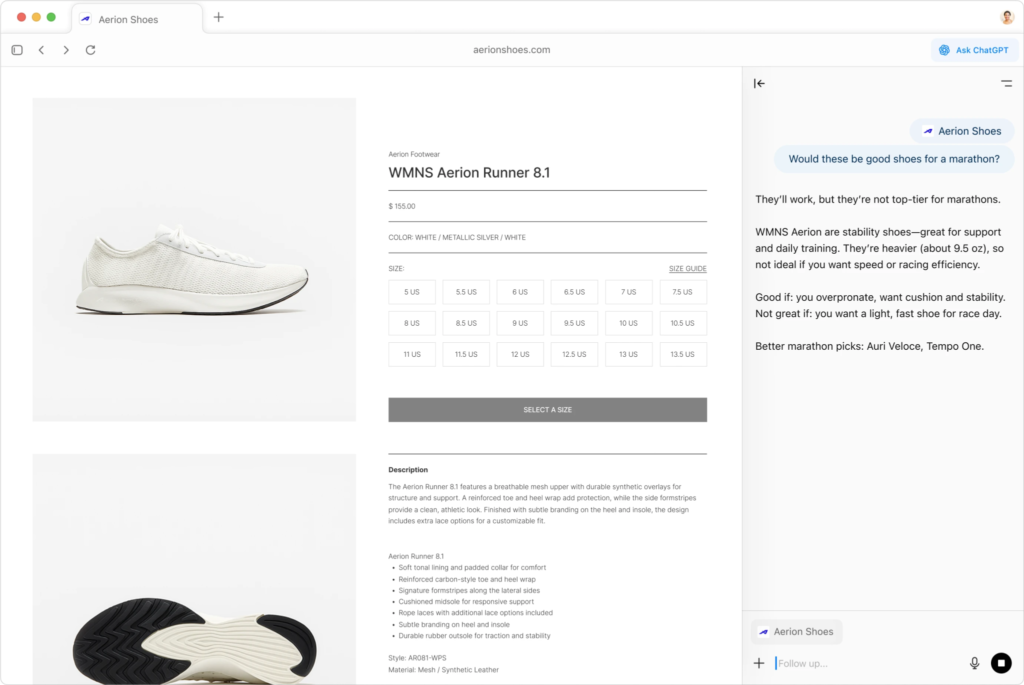
Imagine having ChatGPT embedded into every web page you visit. That’s exactly what Atlas does. It can answer questions about the page, generate summaries, translate content, and even guide you through tasks like form-filling or setting reminders.
This is not merely an upgrade — it’s a fundamental rethinking of the web browser. With Atlas, OpenAI aims to position itself alongside (or even ahead of) AI-integrated browsers like Microsoft Edge (Copilot) and Perplexity’s Comet.
Key Features of ChatGPT Atlas
ChatGPT Atlas brings together multiple technologies from OpenAI’s ecosystem, including GPT-4 Turbo, Vision, and Browsing capabilities. Below are the most notable features:
1. Conversational Interface
At the core of Atlas lies ChatGPT’s conversational ability. Instead of tabs and searches, users communicate directly with the AI assistant. The experience feels natural and fluid — almost like talking to a knowledgeable colleague.
2. AI-Powered Navigation
Atlas can visit websites, find specific sections, extract data, and even interpret web pages in plain language. It’s capable of summarizing long articles, identifying key points, and offering source citations.
3. Sidebar Interaction
A floating sidebar allows users to interact with ChatGPT while browsing. You can ask questions about the page, request explanations, or generate related queries — without switching tabs.
4. Browser Memories
A revolutionary feature, Browser Memories, enables Atlas to remember your preferences, recent pages, and previous questions. This creates a personalized browsing experience that evolves over time.
5. Agent Mode (Premium)
While Atlas is free for macOS users, its Agent Mode — where the AI performs actions like filling forms, adding calendar events, or ordering items — is limited to ChatGPT Plus and Pro subscribers.
This premium mode essentially gives ChatGPT hands-on control within your browser.
6. Cross-Integration with ChatGPT Account
Your OpenAI account syncs across devices. All your saved chats, prompts, and memories integrate with the browser, ensuring a consistent experience between the web version of ChatGPT and Atlas.
7. Privacy & Security
Since Atlas is built by OpenAI, it inherits the company’s commitment to user data protection. All browsing interactions remain secure, and users have full control over what data the AI remembers.
How to Download and Install ChatGPT Atlas (macOS)
Setting up ChatGPT Atlas on macOS is simple. Follow these steps:
Step-by-Step Installation Guide
- Open your preferred browser.
Visit chatgpt.com/atlas from Safari, Chrome, or Edge. - Click on “Download for macOS.”
This will begin downloading the official installer directly from OpenAI’s servers. - Move the installer to Applications.
Since it’s not from the Mac App Store, macOS may warn you. Move the file to your Applications folder manually. - Launch the app.
Double-click ChatGPT Atlas.app, log in to your OpenAI account, and you’re ready to explore. - Import your data (optional).
You can import bookmarks, passwords, and browsing history from your current browser. - Enable Browser Memories.
Allow ChatGPT to remember sessions for personalized suggestions and continuity. - Set Atlas as your default browser.
OpenAI offers free boosted limits for seven days if you make Atlas your default.
Pricing and Availability
| Plan | Availability | Features | Price |
|---|---|---|---|
| Free Plan | All macOS users | Access to ChatGPT-4 Turbo, browsing, and basic AI chat | ₹0 |
| Plus Plan | Subscription-based | Access to GPT-4 Turbo, faster responses, and limited Agent Mode | ₹1,999/month (approx.) |
| Pro Plan | For advanced users | Full Agent Mode access, API integration, and automation | ₹3,499/month (approx.) |
Note: Prices are approximate based on OpenAI’s global plan tiers and may vary regionally. The browser itself, however, is completely free to download and use.
Performance and Design
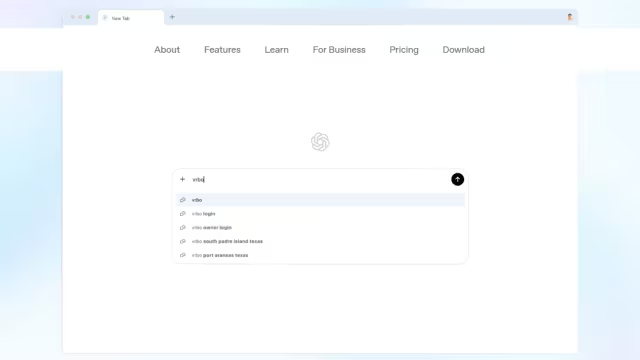
Atlas’s interface is clean, minimalist, and futuristic. Upon launch, you are greeted not by a search bar, but by a conversational window asking, “What would you like to explore today?”
Its design philosophy centers on efficiency and focus — replacing cluttered tabs with contextual conversations. You can manage multiple threads simultaneously, ask follow-up questions, or reference earlier queries.
Unlike traditional browsers that overload you with buttons and bookmarks, Atlas organizes everything through smart categorization and natural dialogue.
The browsing engine is optimized for speed and responsiveness, leveraging OpenAI’s infrastructure for faster content delivery and understanding.
ChatGPT Atlas vs Competitors
| Feature | ChatGPT Atlas | Perplexity Comet | Microsoft Edge (Copilot) | Chrome with Gemini |
|---|---|---|---|---|
| AI Model | GPT-4 Turbo | Perplexity LLM | GPT-4 (limited) | Gemini 1.5 |
| Agent Actions | Yes (Pro only) | Yes | Limited | Limited |
| Personalized Memory | Yes | Partial | Partial | No |
| Availability | macOS (Windows soon) | Cross-platform | Windows/macOS | Cross-platform |
| Interface Type | Conversational | Conversational | Hybrid | Search-based |
| Pricing | Free base, paid Pro | Free | Free | Free |
| Data Privacy | User-controlled | Encrypted | Microsoft Cloud | Google Cloud |
The comparison makes it evident — OpenAI’s ChatGPT Atlas is positioned at the forefront of AI browser technology, combining the intelligence of ChatGPT with real browsing capabilities in one cohesive ecosystem.
Why ChatGPT Atlas Matters
The release of ChatGPT Atlas represents more than a product launch — it’s a symbol of AI’s integration into daily computing. By making browsing conversational, OpenAI is redefining digital behavior.
Here’s why it stands out:
- Natural Search Revolution – No need for keyword-heavy searches; users can express thoughts conversationally.
- Productivity Boost – AI handles summarization, note-taking, and document exploration automatically.
- Cross-Platform Consistency – ChatGPT experience remains uniform across desktop, web, and mobile.
- Privacy Control – Atlas lets users decide what memories to store or delete.
- Agent Mode Evolution – Marks the beginning of autonomous AI on personal devices.
The browser is not merely a tool; it’s a personal research assistant, capable of evolving with your habits and preferences.
User Experience and Early Feedback
Although Atlas is newly released, early macOS users have already praised its speed, design, and AI integration. Some noted that it feels “like having ChatGPT built into the internet itself.”
Common highlights include:
- Instant comprehension of web content
- Smarter search results
- Better organization of tabs
- No intrusive ads or trackers
However, users also mentioned that Agent Mode’s restriction to Pro/Plus subscribers might limit its full potential for free users — though OpenAI’s 7-day boosted trial somewhat balances that.
The Future of Browsing with OpenAI
OpenAI’s roadmap for Atlas is ambitious. Future versions are expected to include:
- Windows and Linux support
- Voice-based browsing
- Multi-tab conversational management
- Plugin support for third-party tools
- Offline AI capabilities
The integration of Sora 2, OpenAI’s video generation model, may also enable visual search experiences — where users can “see” results instead of just reading them.
As AI agents become more autonomous, Atlas could evolve into a fully interactive digital workspace, blending productivity, browsing, and creative assistance seamlessly.
Expert Opinion
According to digital experts, ChatGPT Atlas could “reshape the browser landscape” in the next two years. By making interaction conversational rather than mechanical, OpenAI taps into human intuition — the way people naturally ask questions and seek answers.
Tech analysts also believe Atlas will push competitors like Google and Microsoft to accelerate AI browser integration, sparking a new wave of innovation.
Final Verdict
ChatGPT Atlas is a glimpse into the future of human-computer interaction. It’s intuitive, intelligent, and impressively well-designed for a first-generation release.
While it’s currently limited to macOS and some advanced features are paywalled, the overall experience is refreshing, futuristic, and highly functional. For users who already rely on ChatGPT for research, writing, or learning, Atlas offers the perfect next step.
Pros and Cons Summary
| Pros | Cons |
|---|---|
| AI-driven conversational browsing | Agent Mode locked behind Pro plan |
| Free for macOS users | macOS-only at launch |
| Fast and privacy-focused | Occasional learning curve for new users |
| Personalized memory and suggestions | Limited extensions (for now) |
| Simple setup and intuitive UI | Requires stable internet for best experience |
Conclusion
With ChatGPT Atlas, OpenAI has successfully transformed the humble web browser into an intelligent assistant. Whether you’re a researcher, writer, student, or casual internet user, this new browser offers an elevated, smarter way to explore the web.
In a world where information is abundant but time is limited, Atlas gives users something invaluable — clarity, speed, and understanding.
And with its free availability for macOS, there’s no reason not to experience the next generation of browsing today.