


By: Anushka Verma | Updated: October 28, 2025
🌟 Introduction: The New Age of AI Creativity
Imagine opening Instagram, choosing your favorite photo, and simply typing —
“Make it look like a cinematic sunset” or “Remove that messy background.”
In just a few seconds, the image transforms exactly as you imagined. No filters, no brushes, no layers — just your words and Meta’s AI doing the rest.
That’s the power of Instagram’s new Restyle feature, a bold step by Meta towards a more creative and effortless social media future.
The feature, officially launched on October 24, 2025, allows users to edit both photos and videos in Stories using natural language prompts. Whether you want to remove an unwanted object, change lighting, or completely shift the mood of your content, Restyle does it all — intelligently, instantly, and beautifully.
📊 Feature Summary: At a Glance
| Feature | Instagram Restyle (Meta AI) |
|---|---|
| Launched by | Meta Platforms, Inc. |
| Release Date | October 24, 2025 |
| Available on | Instagram (Android & iOS) |
| Supported Formats | Photos and Videos in Stories |
| Price / Cost | Free (Integrated in the Instagram app) |
| Technology Used | Meta AI (Natural Language Processing) |
| Core Function | Edit visuals using text prompts |
| Similar Feature | Google Photos “Help Me Edit” |
| Best for | Story creators, influencers, content editors |
| Availability | Global rollout in phases |
🧠 What is Instagram Restyle?
Instagram Restyle is Meta’s newest AI-powered editing assistant designed to make visual storytelling easier than ever.
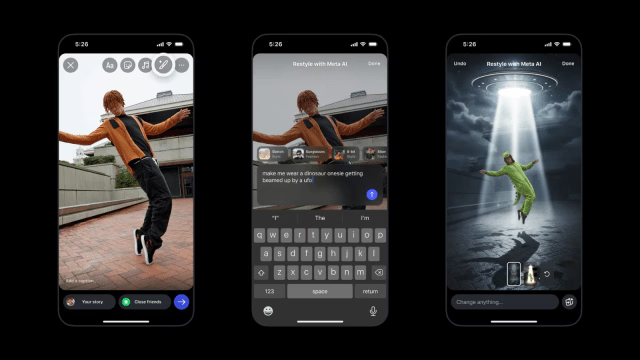
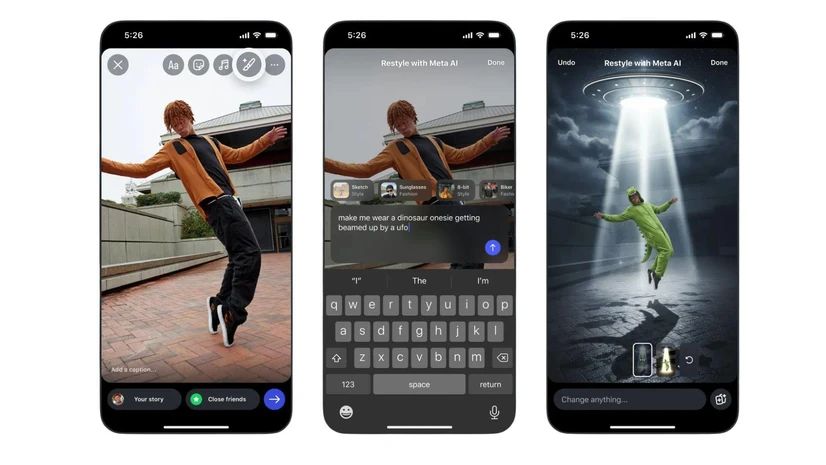
It allows users to use everyday language — not technical editing commands — to transform their photos and videos. Want to remove an unwanted shadow? Add a vintage glow? Change your outfit’s color? Just describe it. Meta AI handles the rest.
Think of it as having a professional editor inside your Instagram app — one that understands your words, visualizes your imagination, and delivers it in seconds.
Meta’s engineers describe Restyle as “AI for human creativity.” It’s not meant to replace your creative instinct, but to amplify it — allowing everyone, even those with no design skills, to create content that looks polished, emotional, and trend-ready.
📸 How to Use Instagram Restyle
Using the feature feels familiar, yet magical. Meta has made sure it integrates seamlessly into Instagram’s user interface, so there’s no learning curve.
🖼 For Photos:
- Open Instagram and tap the “+” button on the top left.
- Choose a photo from your camera roll.
- Tap on the Restyle icon — it looks like a small paintbrush.
- A text box appears where you can type your prompt — for example:
“Make the background look like a Paris street.” - Wait a few seconds as Meta AI processes your request.
- Preview your new, AI-edited image.
- Tap “Done” and share it on your Story.
🎬 For Videos:
- Select a video clip from your gallery.
- Tap the Restyle icon.
- Choose from various AI-generated presets (like “Retro Film,” “Studio Lighting,” or “Soft Cinematic”).
- Watch the preview, adjust as needed, and tap “Done.”
- Share your stylized Story instantly.
The best part? Every edit looks natural — the AI ensures that skin tones, light reflections, and compositions remain realistic.
✨ Why Instagram Restyle Matters
This is not just another photo filter. Restyle represents a deeper technological and cultural shift — a movement toward AI-augmented creativity.
In a world where attention spans are short, and social media is flooded with content, quality and originality stand out. Restyle empowers users to achieve that effortlessly.
You no longer need advanced editing skills or expensive apps. With just a few words, you can make your Story look professional and unique — while maintaining your authentic vibe.
🧩 Behind the Innovation: Meta’s Vision for Restyle
Meta has been gradually integrating AI across its platforms — from AI-generated stickers and smart replies in Messenger to AI-powered avatars. Restyle is part of this larger ecosystem.
According to Meta:
“Restyle allows you to creatively express yourself by using natural language to shape your visual stories. Whether it’s removing distractions, enhancing colors, or transforming moods — AI brings your imagination to life.”
This statement reflects Meta’s long-term strategy: making AI a collaborative partner in self-expression rather than a tool hidden behind algorithms.
🎨 How Restyle is Different from Google’s “Help Me Edit”
While Google Photos introduced “Help Me Edit,” Instagram’s Restyle goes a step further by embedding the feature directly into a social platform. You’re not just editing photos — you’re editing for engagement, emotion, and trendability.
| Feature | Instagram Restyle | Google Help Me Edit |
|---|---|---|
| Platform | Instagram Stories | Google Photos |
| Edit Type | Natural language edits for photos & videos | Natural language edits for photos only |
| Integration | In-app editing for social sharing | Cloud-based, for personal use |
| Output Focus | Storytelling & content creation | Photo correction |
| AI Style | Creative & expressive | Realistic & clean edits |
Restyle, therefore, feels more emotional — it understands the storytelling intent behind your edits.
💬 Example Prompts You Can Try
If you’re new to using AI-based editors, here are some prompt ideas that will give you a feel for the tool’s power:
| Prompt | Result |
|---|---|
| “Add a soft pastel glow” | Smooth, dreamy tone with warm lighting |
| “Turn this background into a tropical beach” | AI replaces backdrop seamlessly |
| “Make it look like a watercolor painting” | Adds artistic filter |
| “Brighten the face and add cinematic lighting” | Focuses on portrait lighting |
| “Add sparkles and glitter effect” | Perfect for festive or party content |
| “Change outfit color to royal blue” | Modifies color tones realistically |
| “Add film grain and vintage look” | Retro aesthetic with texture |
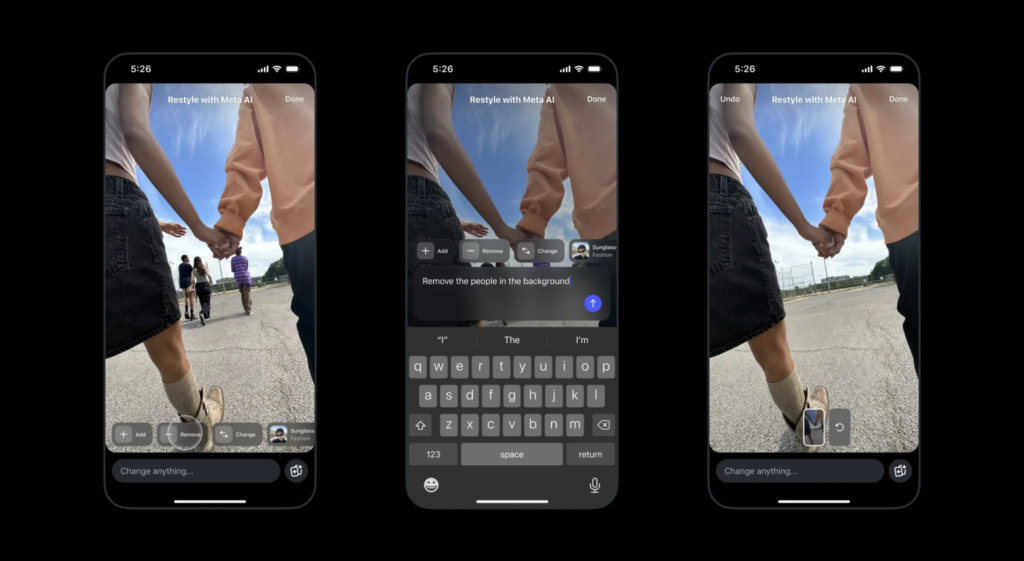
| “Remove cup from the table” | Smart object removal |
| “Change vibe to moody evening” | Adjusts tone and hue dynamically |
These prompts are just starting points — Meta AI’s system can interpret hundreds of nuanced descriptions.
🔍 Why Users Love It
Early testers and content creators have called Restyle “addictive,” “brilliant,” and “shockingly accurate.”
One influencer wrote:
“I asked it to make my photo look like a golden hour portrait — and it actually captured the perfect sunset tones. It feels like magic.”
Another user noted:
“I’m not a professional editor, but now my Instagram Stories look like they were shot for a magazine.”
This is exactly what Meta aimed for — AI that democratizes creativity.
💸 Price: Is Instagram Restyle Free?
Yes, Instagram Restyle is 100% free. There’s no subscription, no in-app purchase, and no watermark.
Meta has confirmed that Restyle will remain free for all users — though in the future, premium “AI Presets” or “Restyle Packs” might be introduced for business or influencer accounts.
This decision keeps Instagram competitive against third-party editing tools like VSCO, Lightroom, and CapCut.
🌍 Global Rollout and Availability
Restyle is currently rolling out in the U.S., India, UK, Canada, and Australia, with more countries joining in the coming weeks.
To access it:
- Make sure your Instagram app is updated to version 335 or later.
- Open Stories → Add image/video → Tap the paintbrush icon → Type your prompt.
If you don’t see the feature yet, it’s likely arriving soon as part of Meta’s staggered rollout schedule.
🧭 Meta’s Prompt Writing Guide
To help users get the best results, Meta shared a few tips on writing effective prompts:
- Be specific — Instead of “Make it pretty,” say “Add warm lighting and golden hour tone.”
- Mention mood — Words like dreamy, soft, cinematic, vintage, artistic help the AI understand tone.
- Describe focus — “Highlight the person and blur the background.”
- Use action verbs — Add, remove, enhance, change, transform.
- Keep it short and clear.
Meta AI responds best to natural, conversational English — the kind you’d use to describe your imagination to a friend.
📈 The Impact on Digital Creators
Restyle is more than a feature; it’s a paradigm shift for digital content creation.
Influencers and marketers are already predicting how this will change the game:
- Faster content cycles: No need to wait for designers — creators can restyle content daily.
- More originality: AI generates unique looks, avoiding the “same filter” fatigue.
- Improved engagement: Beautiful visuals get more story views, reactions, and shares.
- Personal branding: Creators can develop signature visual themes through consistent prompt use.
🔮 What This Means for the Future of Social Media
AI is quietly becoming the creative engine of social media.
Instagram Restyle is a glimpse into a future where your imagination, not your technical skill, defines what you can create.
Soon, we might see:
- AI captions that match your visual tone.
- AI-generated background music that syncs with your video’s emotion.
- AI filters that evolve dynamically based on trends.
- AI story suggestions, helping users stay relevant effortlessly.
In short, social media will shift from editing platforms to creative companions.
⚡ Pros and Cons: A Balanced View
| Pros | Cons |
|---|---|
| Easy to use; no technical skills needed | AI sometimes misinterprets vague prompts |
| Seamlessly integrated into Instagram | Heavy processing may slow older devices |
| Works for both photos and videos | Limited presets for videos (initially) |
| Free for all users | Requires stable internet connection |
| Produces professional-level edits | Raises authenticity concerns for influencers |
While Restyle brings a world of creative freedom, experts also emphasize the need for transparency — ensuring AI-generated visuals are used ethically, especially in advertising and journalism.
🧠 Expert Opinions
Dr. Riya Nanda, AI researcher at IIT Delhi, says:
“Restyle showcases the growing role of natural language processing in visual editing. It bridges human expression with machine understanding — a true milestone in everyday AI use.”
Tech critic Arjun Malhotra adds:
“Instagram has turned editing into a conversation. You tell it what you want, it listens, and it delivers. That’s real progress.”
Their views highlight how AI is evolving from a backend algorithm to a frontline creative collaborator.
📚 Historical Context: From Filters to AI
Instagram started with 13 filters in 2010. Then came Stories, Reels, AR effects, and now — AI.
Each upgrade brought users closer to effortless creativity. Restyle is the natural next step in that journey.
Just as filters defined the Instagram aesthetic of the 2010s, AI restyling will define the 2020s — where every user can tell their story in their own visual language.
🌈 Human Creativity Meets Artificial Intelligence
There’s a poetic beauty in how AI and human imagination are merging.
AI can’t feel emotion — but it can translate human emotion into visuals. Restyle does exactly that. It takes your words, your mood, your imagination, and brings them alive in pixels.
This human-AI collaboration doesn’t replace creativity; it expands it. The artist is still you — AI is just your new paintbrush.
🧾 Final Summary
| Aspect | Details |
|---|---|
| Feature Name | Instagram Restyle |
| Launch Date | October 24, 2025 |
| Platform | Instagram (Android & iOS) |
| Developer | Meta Platforms, Inc. |
| Technology | Meta AI (Natural Language Processing) |
| Price | Free |
| Primary Function | Edit photos & videos using text prompts |
| Competitor | Google Photos “Help Me Edit” |
| Availability | Rolling out globally |
| Ideal Users | Influencers, storytellers, brands, everyday users |
| Future Potential | AI-generated music, captions, and 3D filters |
🪶 Conclusion: The Future Belongs to the Creators
Instagram’s Restyle AI is more than a feature — it’s a statement.
A declaration that creativity is for everyone, not just designers or photographers.
It’s for that student editing her travel photos before uploading them.
For the small business owner who wants their product story to shine.
For the influencer chasing the perfect aesthetic.
And for everyone who believes that storytelling is an art — now made effortless by AI.
In the words of a creator who tried it early:
“Restyle doesn’t just edit your photo. It understands your vision.”
And that’s exactly where the future of social media is headed —
toward a world where your imagination is enough.